So I've posted before how I think ClickHouse is great. Its columnar storage is fast, it has amazing compression. I won't bore you with those details, you can see them all here: https://matduggan.com/clickhouse-is-winning-the-observability-wars/
However all technology is great until you try to do something atypical with it.
What I wanted was a realistic torture test: network firewall telemetry, on the order of 2 billion rows a day of mixed-vendor syslog, parsed at ingest into wide typed tables with a 14-day TTL. The dashboards needed to do two things at once in Grafana: fast lookup of individual log lines, and fast visualizations where you can stack ad-hoc filters on top of each other across every panel simultaneously.
I learned a lot of things about ClickHouse. Also some things about myself, not all flattering.
TL;DR
This ended up being significantly harder than I thought it would be, and part of that is that I made a ton of mistakes. Don't email me mean comments. I'm writing this up as a warning to the people coming behind me, and I'll own every mistake as we go.
For the happy OTel path, CH is very easy. Few hundred metrics, couple million logs a day, several thousand traces, not a problem. For the more complex custom route, CH is extremely powerful but it's hard to use.
The theme of the whole project is that this stack fails silently. ClickHouse is the most agreeable coworker you'll ever have because it never says you are wrong, it just lets you be super wrong. A query that looks fine reads 84x more rows than it should. A misconfigured filter just doesn't apply. A projection that never routes still returns correct numbers, slowly. Once I understood that ClickHouse will never tell me that I did something wrong and that I had to figure out I did something wrong, we got along fine.
You have to build verification habits before you build anything else. system.query_log is your friend, your bartender, the lovable dog in a horror movie. This is the only thing in the system that says you messed up.
Here are the lessons I learned. Hopefully they save someone else from going down the same path I did.
Setup
So we're not doing anything weird here.
- ClickHouse is a 2 shard x 3 replicas setup underneath the Altinity operator. Every table is a
ReplicatedMergeTreewrapped inDistributedtables and Grafana only ever queries the wrapper. - Grafana is the official
grafana-clickhouse-datasourceplugin, 25 panels and then ad-hoc filters up at the top that apply to every panel at once. - Hard guardrails we cannot break.
max_rows_to_read= 1 billion,max_bytes_to_read= 100 GB,max_execution_time= 60s, all inthrowmode. I can raise these but the entire point of this process was to operate inside of the CH model for data and try to leave those alone.
Lesson 1: Don't handwrite the filters
My first draft of the dashboard wrote filters the way I'd typically write them in normal SQL, by adding a guard so the query stays valid regardless of what the user picks.
WHERE (empty({{observer}}) OR observer IN {{observer}})
This would end up being quite the stupid decision.
| predicate | rows read | time |
|---|---|---|
observer = 'one-device' (direct) |
3.05M | 115 ms |
(empty(...) OR col IN ...) guard |
257.64M | 1,134 ms |
Eighty-four times the rows, ten times the time, same answer. Why is this so much worse? I'm not entirely sure. My best guess is that the guard keeps primary-key pruning from engaging, so you get a full partition scan with post-filtering. I clearly measured the effect but I'm not exactly sure how to prove the mechanism. EXPLAIN was my only savior here.
The fix was to stop putting in the WHERE-clause filtering by hand and use Grafana ad-hoc filtering. The key learning here is how the plugin does that and why it makes a difference. It does not rewrite your WHERE clause. It appends the filter as a ClickHouse query setting, additional_table_filters, which means it is applied at planning time and prunes exactly like a hand-written query.
| form | rows read | time |
|---|---|---|
| no filter | 256.90M | 1,265 ms |
hand-written WHERE observer = '...' |
4.67M | 170 ms |
| ad-hoc filter | 4.67M | 284 ms |
Lesson 2: Sort keys matter sorta (dad joke, you are welcome)
When I first set up the main table, I did the following:
ORDER BY (observer, action, application, toStartOfHour(Timestamp), Timestamp)
The logic made sense at the time, even if it didn't end up holding up. We're sorting by network device first since of all of these, there are going to be the least number of network devices. But what I didn't really think about is that every panel is time-bound because of course they are, that's how Grafana works. In ClickHouse only the front of the sort key gets the fast lookup path. Obvious in retrospect, but stumped me for a hot minute. I thought I was structuring this by lowest cardinality (device) and then out to most cardinality, which logically made sense.
If all you want is information on the right way to do this, you can find that here: https://clickhouse.com/blog/working-with-time-series-data-and-functions-ClickHouse and https://oneuptime.com/blog/post/2026-03-31-clickhouse-choose-order-by-key/view
What does ORDER BY mean in ClickHouse?
What's important to understand about this index is that it's not the same as like MySQL necessarily. It's the physical layout, the rows are written to disk in sorted order like a phone book sorted by lastname, firstname.
ClickHouse by design doesn't keep a very large "bookmark list", every 8192 rows (called a granule), it writes down the sort-key values at that spot. That bookmark list is the primary key.
So the Fast lookup only works for a prefix of the sort columns:
- "All the Smiths" → jump straight to the S section. Fast.
- "Everyone named John" → Johns are scattered through every last-name section → you read the whole book. Slow.
- Their table also splits data into daily partitions (separate files per day). That's a coarse filter that works no matter what the sort key is (remember this, it becomes important)
Why is timestamp in there twice?
Everyone asked me why I did that, let me explain.
The two entries are not the same thing.
toStartOfHour(Timestamp)— the hour bucket. It rounds 14:37:22 down to 14:00:00. This is the "cutoff"Timestamp— the exact time.
Within any fixed (observer, action, application) group, sorting by (hour, exact-time) produces exactly the same order as sorting by (exact-time) alone — the hour is just a rounded copy of the same value, so it can never re-order two rows.
So my first design was basically this (observer, action, application, hour, Timestamp).
So time sat at position four, and the most common predicate in the dashboard was aimed at the worst-positioned column. The tail-logs panel with ORDER BY Timestamp DESC LIMIT 1000, a multi-hour window, measured before the guardrails went up, read 291.8M rows, 158 GiB, in 18.9 seconds; with one observer filter, 23.1M rows, 936 ms. The newest rows sit at the end of each device’s block so a newest-N query has to walk every device's block to find the tail.
The fix:
(toStartOfHour(Timestamp), observer, action, application, Timestamp)— puts the bucket first, so an hour range is one contiguous block. All the Smiths together.

Here's what makes this decision consequential: MODIFY ORDER BY can't reorder, prepend, or absorb existing columns. You can only append columns added in the same ALTER. Get the key wrong on day one and the fix is not an ALTER; it's a new table, ~520 GiB of backfill per shard under live ingest, and an atomic swap. Ask me how I know. MODIFY ORDER BY turns out to be less 'modify' and more 'build a second house next door, carry everything over by hand, then swap the mailboxes.
After all those lessons, I ended up running a benchmark that was the kind of beautiful baby benchmark you dream of where it confirms you solved every problem. An identical aggregate query, 156 ms vs 1,690 ms. 10.8x faster! I felt great about that for most of an afternoon, which is how long it took to notice that 88% of the old table's partition had tiered to S3 while the new table sat entirely on local NVMe. We had benchmarked a Ferrari against a tractor and concluded the tractor was slow. Which is true. It is also not the thing we measured. Excellent work.
The same-tier control with both on NVMe produced no noticeable query differences. So was it worth reorganizing? I'm not sure! I think?
This took a long time to do, so triple check this part.
Lesson 3: Projections are trickier than I thought
So when you first run across projections in ClickHouse, they seem pretty great.
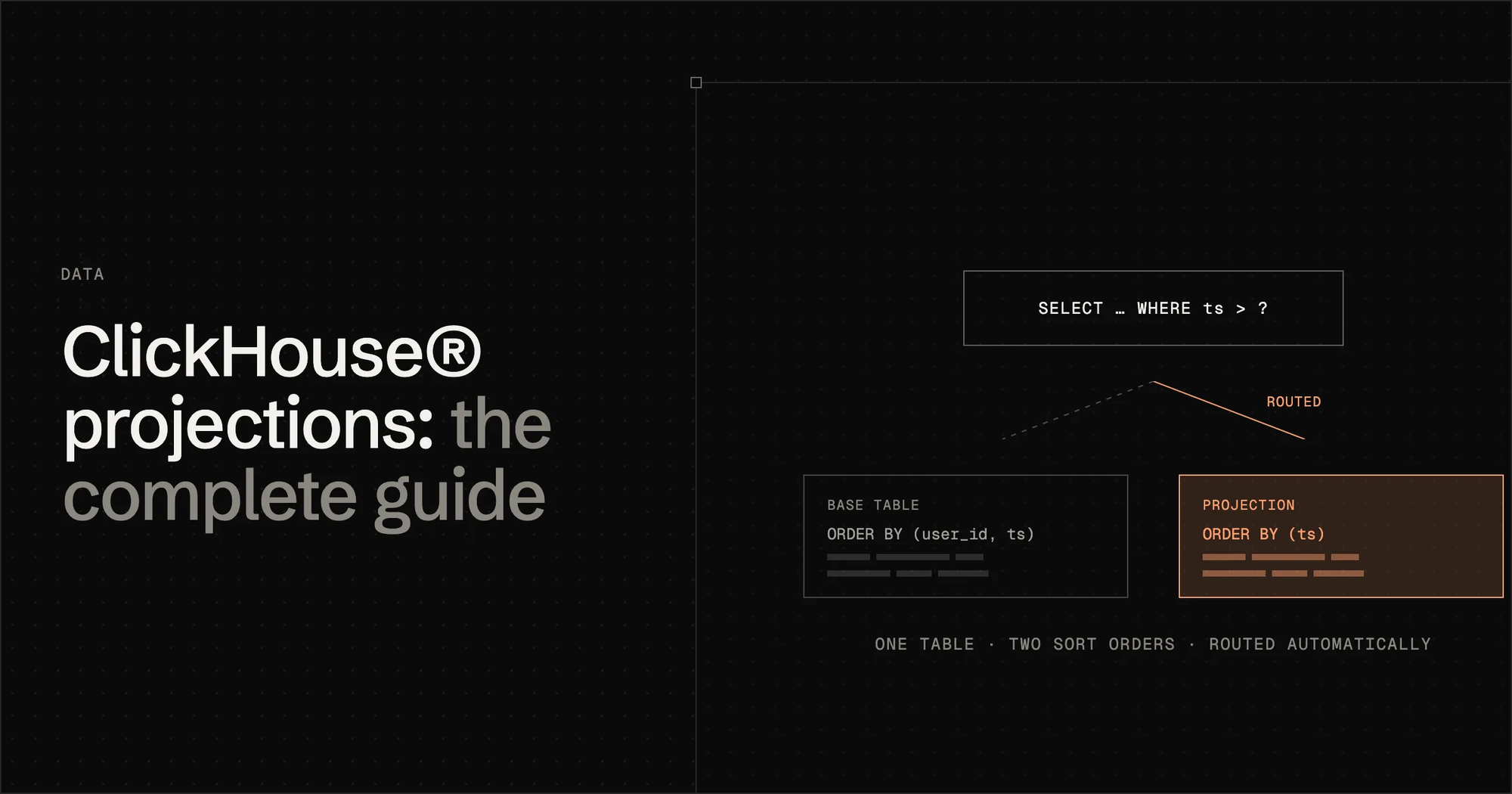
A projection is not a separate table you manage. It's an alternative physical ordering of the same data, stored inside the same table. Think of it this way: your table is a book sorted by chapter number. A projection is an index at the back, sorted by topic.
When a query matches your projection, it should just automagically read from the projection instead of the base table. You don't need to change the query, which is great. New data populates the projection on INSERT, which is what you want for this sort of stuff.
Think of it like this:
- Every table stores data in parts, which are directories on disk.
- When you add a projection, each part directory gets a subdirectory for the projection data with an anonymous table with its own columns, index, granultes.
- Projection parts merge at the same time as main table parts, so there's no lag like what you can experience with materialized views.
- Projections don't backfill by default but you can backfill them, which is a mistake that I made initially where I added one, nothing was better and I assumed I had messed up.
Projections are great for network firewall data because the data doesn't need to change shape. I just need to optimize my querying of the data for specific usecases.
The biggest misunderstanding about how projections worked is that I made a lot of assumptions about how expression matching worked. I assumed (for no good reason) that expression matching was loose and that CH would do a lot of work to ensure my query was routed to the projection. count() and sum(duration) won't be used by a query asking for avg(duration), which didn't occur to me until I read this: https://obsessiondb.com/blog/clickhouse-projections-complete-guide
Also every filter column must be in the projection's GROUP BY. This means a filter on an absent column → full fallback to raw. This was a fucking nightmare to debug until I figured this out.
| WHERE clause | routed? | rows read |
|---|---|---|
| (none) | yes | 2,022 |
toStartOfHour(Timestamp) >= X |
yes | 2,022 |
toStartOfInterval(Timestamp, INTERVAL 1 HOUR) >= X |
no | 12,373,248 |
Timestamp >= X (raw) |
no | 12,373,248 |
Here are the basic lessons you must understand to do a large scale project.
- The query’s aggregates must be a subset of the projection’s — count() and sum(duration) won’t serve avg(duration).
- Every filter column must be in the projection’s GROUP BY — otherwise, silent fallback to raw.
- The time predicate must use the projection’s own expression: toStartOfHour(Timestamp) >= X routes; toStartOfInterval(Timestamp, INTERVAL 1 HOUR) >= X — identical values — does not. Same query: 2,022 rows versus 12,373,248. It doesn’t reason about equivalence. It’s a bouncer with a laminated list, and toStartOfInterval is toStartOfHour’s identical twin in a different jacket.
All of this was figured out when I started just obsessively checking query_log. In order to use projections in ClickHouse you have to verify the routing every single time.
Here are my mistakes in no particular order with projections:
- Projections don't automatically backfill which is fine but be aware when you run your benchmark and nothing has changed.
- You gotta think really hard before you add a projection. It's effectively a copy of the data, so make sure your ORDER BY is correct before you try to layer projections on top of it.
system.projection_partsGROUP BY partition tells you the coverage of your projection. You need this in order to know whether the query has access to enough historical projection data for you to actually materialize the thing you want to show.
Lesson 4: Grafana ClickHouse Plugin has a lot of sharp edges
I like Grafana, I love the ClickHouse Plugin group of maintainers, all good vibes over here. But I misunderstood how much this plugin was going to do for me vs what I had to do myself. This is the part of the review where I say nice things and then hand you a first-aid kit.
- A wrong table name in the ad-hoc filter config is silently ignored. An unqualified table key instead of the schema-qualified one returned 79,350,116 rows where the correct key returned 2,314,678. A typo produces a confidently wrong dashboard. The only reliable test: change a filter, confirm the number actually changes, per panel.
- Grafana's ad-hoc filter UI offers one operator and one value per key. There is no way to express
observer = A OR observer = Bthrough the filter box — a long-standing upstream limitation (grafana/grafana#10918, still open for cross-column boolean OR). - Grafana's time handling and panel model will surprise you in every possible way. Hour-bucket edges are a correctness defect factory.
You will not have any idea that the thing you wrote is wrong until you check it by hand or it blows up. My advice is to configure your dashboards to blow up early and often so you don't find out months later that you messed up the query.
Conclusion
ClickHouse is a good tool, but the more complex the thing you try to do with it, the more sharp edges you'll find. I'm also surprised at the ecosystem lacking stuff I expected. I wanted a linter. I got a side quest to make my own. I had trouble getting a full-fledged real migration utility for rolling out changes with advice about impact and cost and then confirming I can always roll back. There are still real gaps in this ecosystem people should be aware of.
As always if I got it wrong (or you know something I don't), email me.