My workflow has remained mostly the same for over a decade. I write everything in Vim using the configuration found here. I run Vim from inside of tmux with a configuration found here. I write things on a git branch, made with the git CLI, then I add them with git add --patch to that branch, trying to run all of the possible linting and tests with git hooks before I waste my time on GitHub Actions. Then I run git up which is an alias to pull --rebase --autostash. Finally I successfully commit, then I copy paste the URL returned by GitHub to open a PR. Then I merge the PR and run git ma to go back to the primary branch, which is an alias to ma = "!f() {git checkout $(git primary) &&git pull;}; f".
This workflow, I think, is pretty familiar for anyone working with GitHub a lot. Now you'll notice I'm not saying git because almost nothing I'm doing has anything to do with git. There's no advantage to my repo being local to my machine, because everything I need to actually merge and deploy code lives on GitHub. The CI runs there, the approval process runs there, the monitoring of the CI happens there, the injection of secrets happens there. If GitHub is down my local repo does, effectively, nothing.
My source of truth is always remote, which means I pay the price for git complexity locally but I don't benefit from it. At most jobs:
You can't merge without GitHub (PRs are the merge mechanism)
You can't deploy without GitHub (Actions is the deployment trigger)
You can't get approval without GitHub (code review lives there)
Your commits are essentially "drafts" until they exist on GitHub
This means the following is also true:
You never work disconnected intentionally
You don't use local branches as long-lived divergent histories
You don't merge locally between branches (GitHub PRs handle this)
You don't use git log for archaeology — you use GitHub's blame/history UI (I often use git log personally but I have determined I'm in the minority on this).
Almost all the features of git are wasted on me in this flow. Now because this tool serves a million purposes and is designed to operate in a way that almost nobody uses it for, we all pay the complexity price of git and never reap any of the benefits. So instead I keep having to add more aliases to paper over the shortcomings of git.
These are all the aliases I use at least once a week.
[alias]
  up = pull --rebase --autostash
  l = log --pretty=oneline -n 20 --graph --abbrev-commit
  # View the current working tree status using the short format
  s = status -s
  p = !"git pull; git submodule foreach git pull origin master"
  ca = !git add -A && git commit -av
  # Switch to a branch, creating it if necessary
  go = "!f() { git checkout -b \"$1\" 2> /dev/null || git checkout \"$1\"; }; f"
  # Show verbose output about tags, branches or remotes
  tags = tag -l
  branches = branch -a
  remotes = remote -v
  dm = "!git branch --merged | grep -v '\\*' | xargs -n 1 git branch -d"
  contributors = shortlog --summary --numbered
  st = status
  primary = "!f() { \
    git branch -a | \
    sed -n -E -e '/remotes.origin.ma(in|ster)$/s@remotes/origin/@@p'; \
  }; f"
  # Switch to main or master, whichever exists, and update it.
  ma = "!f() { \
    git checkout $(git primary) && \
    git pull; \
  }; f"
  mma = "!f() { \
    git ma && \
    git pull upstream $(git primary) --ff-only && \
    git push; \
  }; f"
Enter GitButler CLI
Git's offline-first design creates friction for online-first workflows, and GitButler CLI eliminates that friction by being honest about how we actually work.
(Edit: I forgot to add this disclaimer. I am not, nor have ever been an employee/investor/best friends with anyone from GitButler. They don't care that I've written this and I didn't communicate with anyone from that team before I wrote this.)
So let's take the most basic command as an example. This is my flow that I do 2-3 times a day without my aliases.
git checkout main
git pull
git checkout -b my-feature
# or if you're already on a branch:
git pull --rebase --autostash
git status
I do this because git can't make assumptions about the state of the world.
Your local repo might be offline for days or weeks
The "remote" might be someone else's laptop, not a central server
Divergent histories are expected and merging is a deliberate, considered act
However because GitButler is designed with the assumption that I'm working online, we can skip a lot of this nonsense.
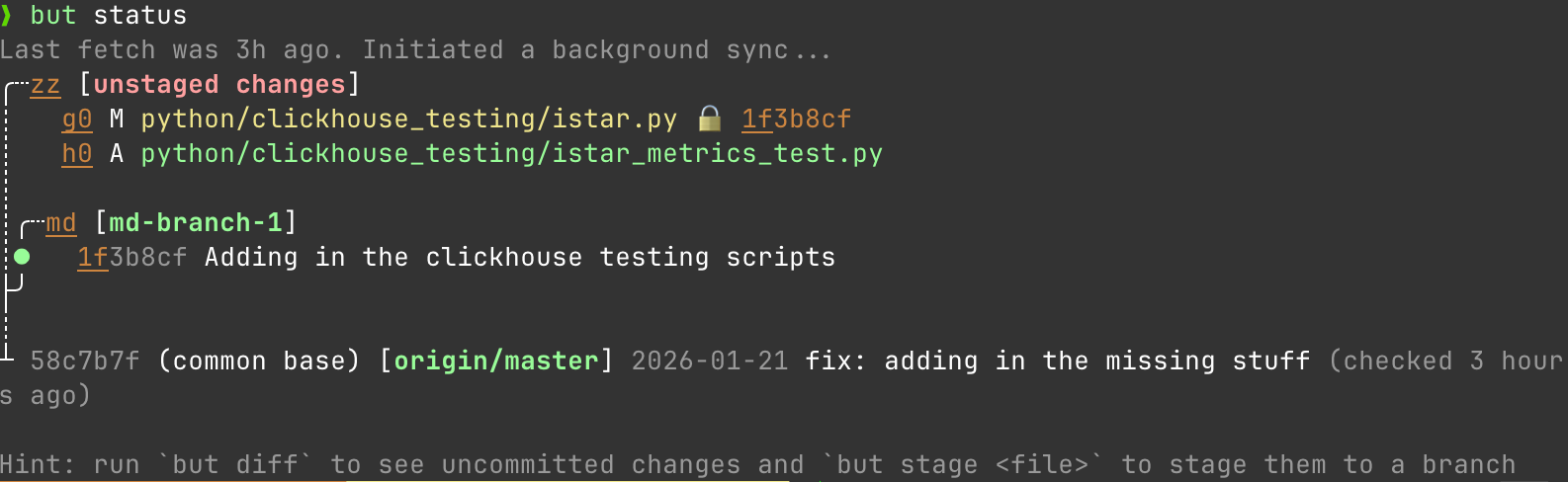
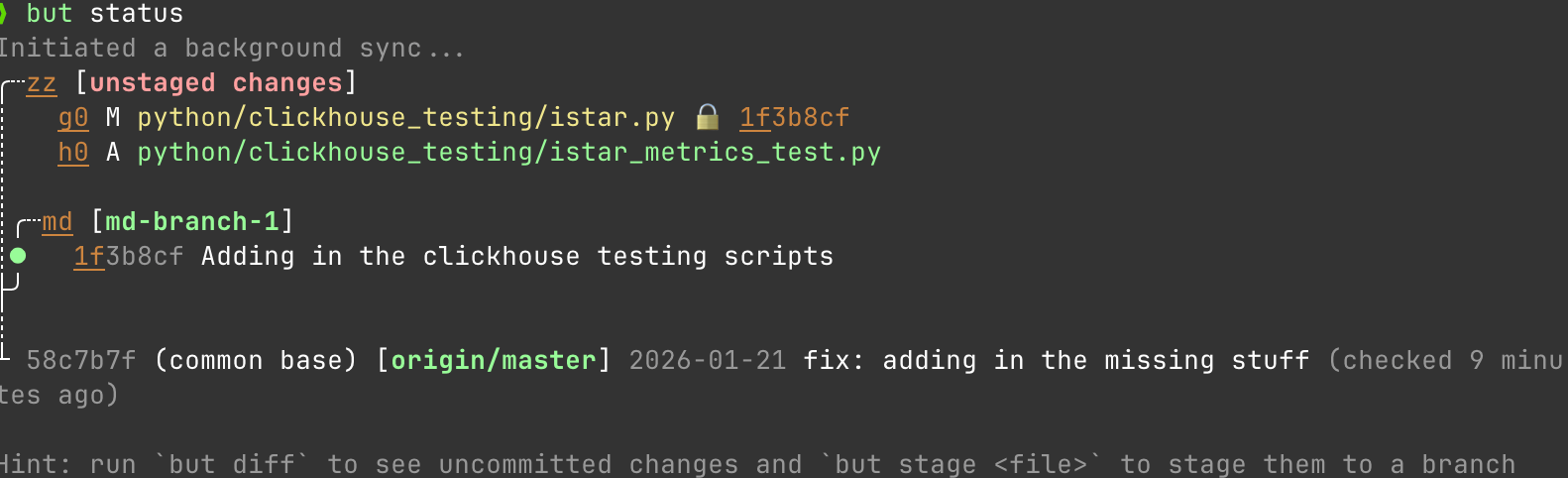
It's status command understands that there is always a remote main that I care about and that when I run a status that I need to understand my status relative to the remote main as it exists right now. Not how it existed the last time I remembered to pull.
However this is far from the best trick it has up its sleeve.
Parallel Branches: The Problem Git Can't Solve
You're working on a feature, notice an unrelated bug, and now you have to stash, checkout, fix, commit, push, checkout back, stash pop. Context switching is expensive and error-prone.
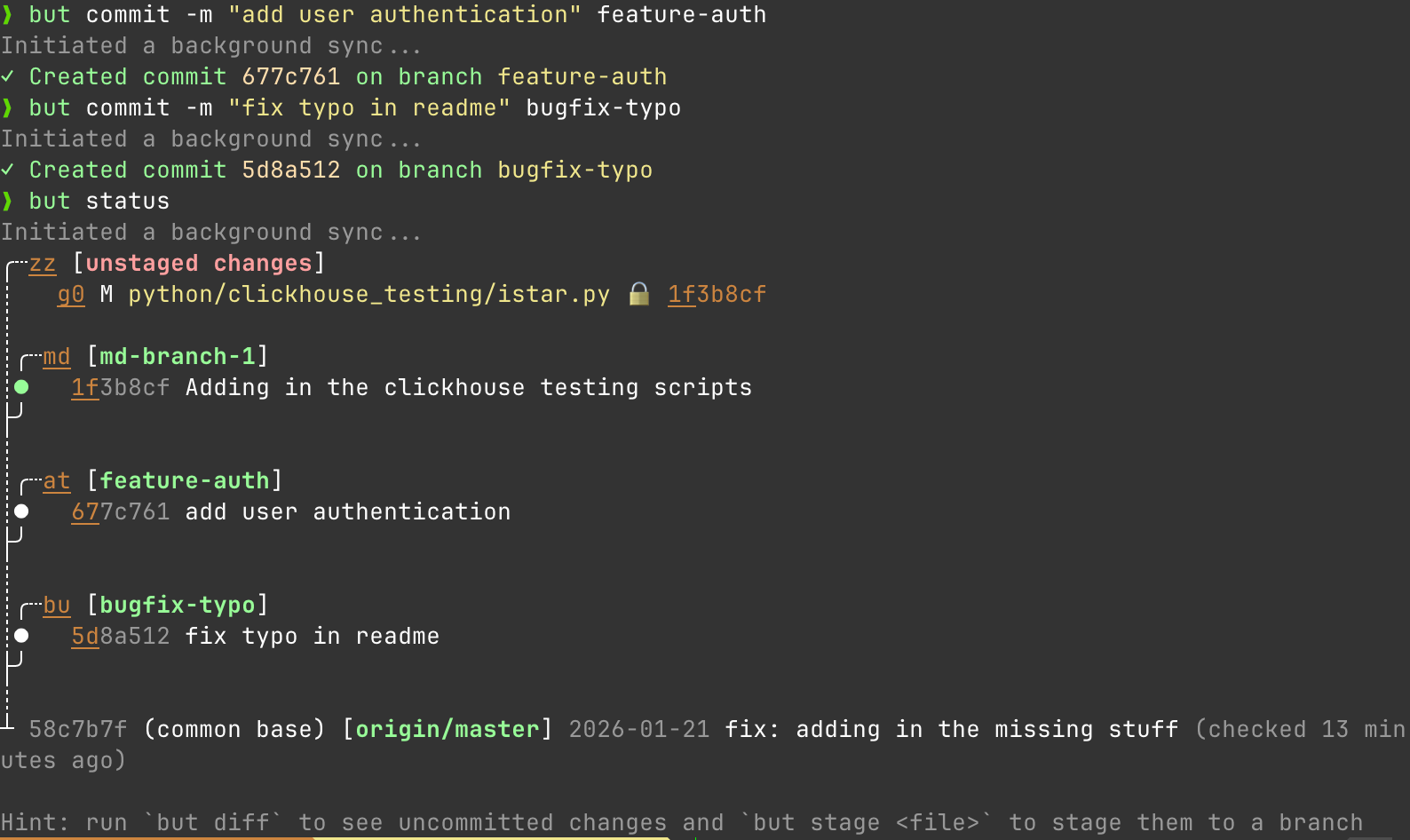
GitButler effectively hacks a solution into git that fixes this with multiple branches applied simultaneously. Assign files to different branches without leaving your workspace. What do I mean by that. Let's start again with my status
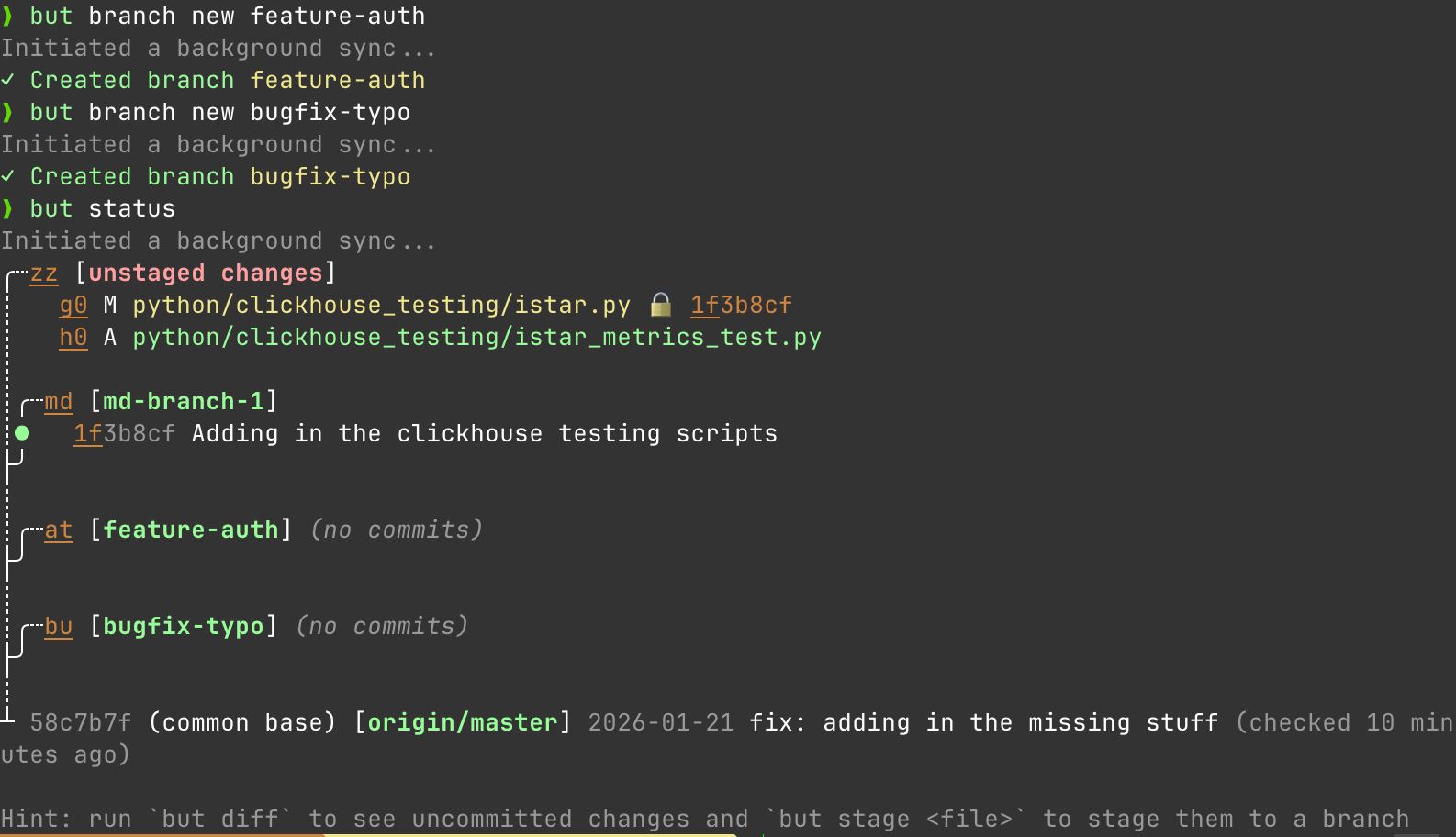
Great looks good. Alright so lets say I make 2 new branches. I'm working on a new feature for adding auth and while I'm working on that, I see a typo I need to fix in a YAML.
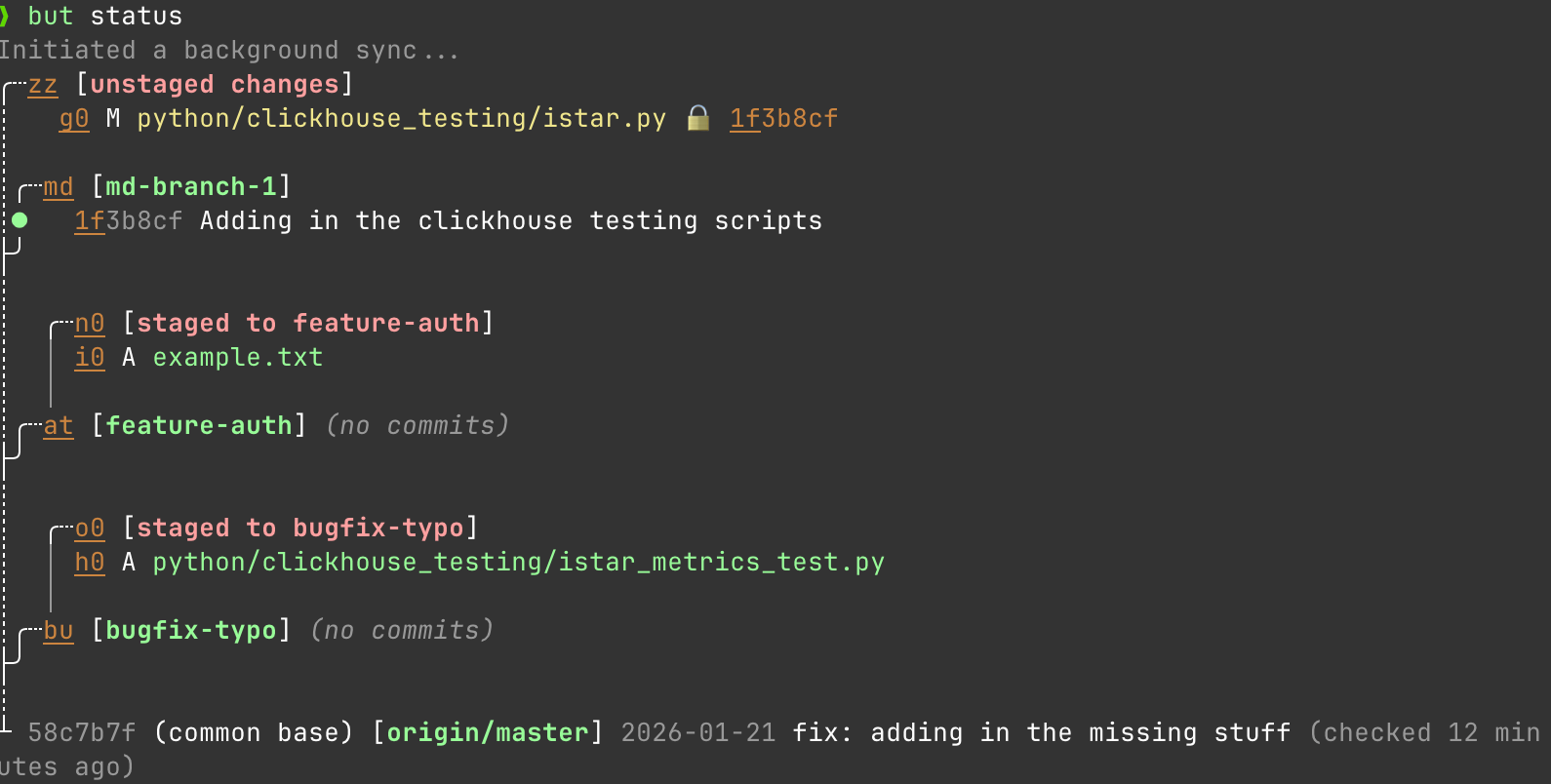
I can work on both things at the same time:
but stage istar_metrics_text.py feature-auth
but stage example.txt bugfix-typo
And easily commit to both at the same time without doing anything weird.
Stacked PRs Without the Rebase Nightmare
Stacked PRs are the "right" way to break up large changes so people on your team don't throw up at being asked to review 2000 lines, but Git makes them miserable. When the base branch gets feedback, you have to rebase every dependent branch, resolve conflicts, force-push, and pray. Git doesn't understand branch dependencies. It treats every branch as independent, so you have to manually maintain the stack.
GitButler solves this problem with First-class stacked branches. The dependency is explicit, and updates propagate automatically.
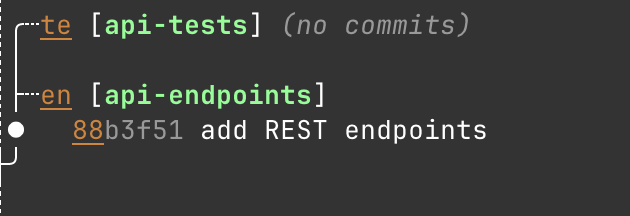
So what do I mean. Let's say I make a new API endpoint in some Django app. First I make the branch.
but branch new api-endpoints
# Then add my stuff to it
but commit -m "add REST endpoints" api-endpoints
# Create a stacked branch on top
but branch new --anchor api-endpoints api-tests
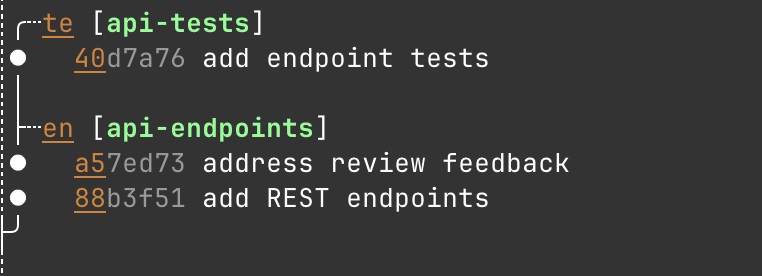
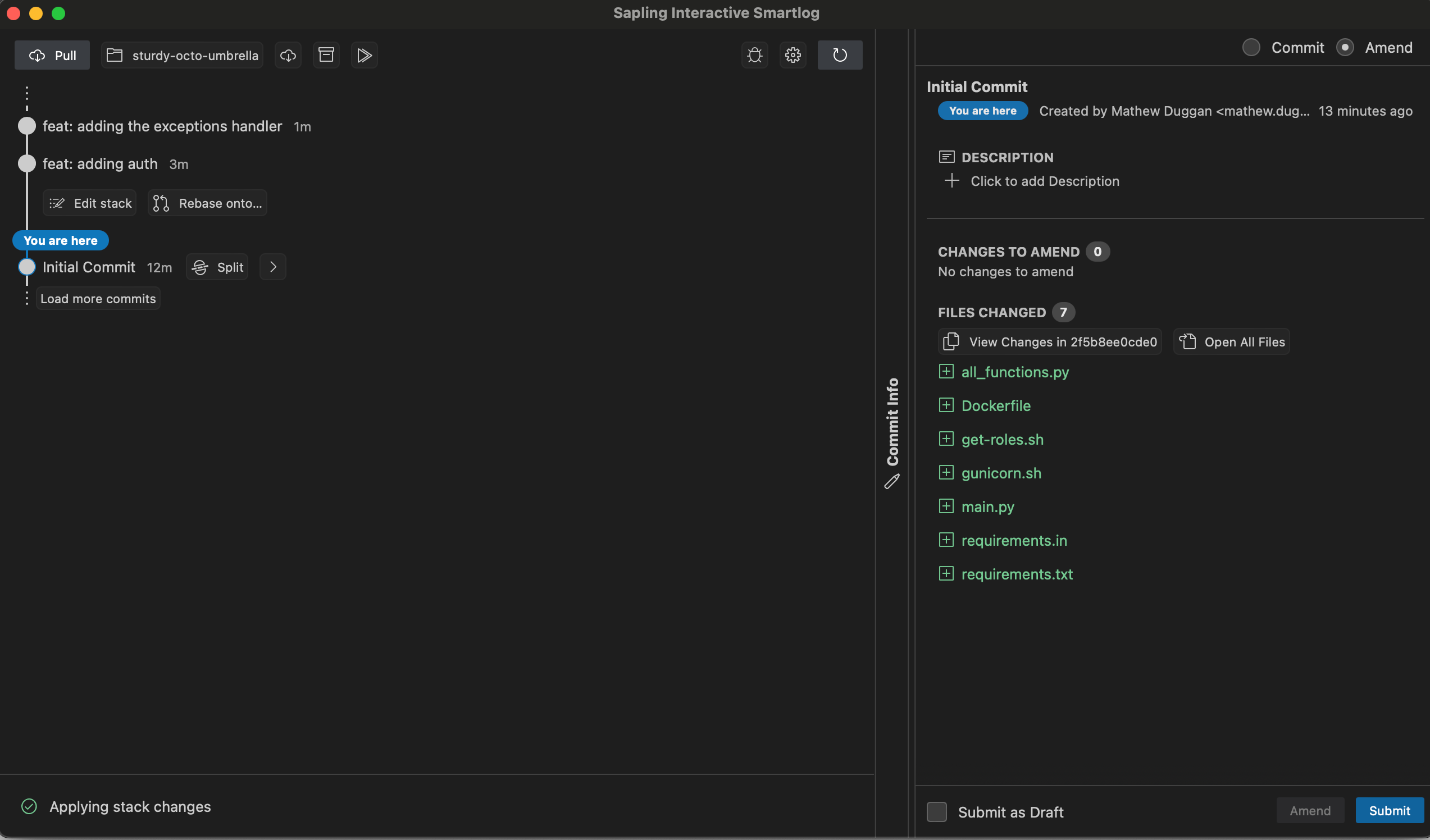
So let's say I'm working on the api-endpoints branch and get some good feedback on my PR. It's easy to resolve the comments there while leaving my api-tests branched off this api-endpoints as a stacked thing that understands the relationship back to the first branch as shown here.
In practice this is just a much nicer way of dealing with a super common workflow.
Easy Undo
Maybe the most requested feature from new git users I encounter is an easier undo. When you mess up in Git, recovery means diving into git reflog, understanding the cryptic output, and hoping you pick the right HEAD@{n}. One wrong move and you've made it worse.
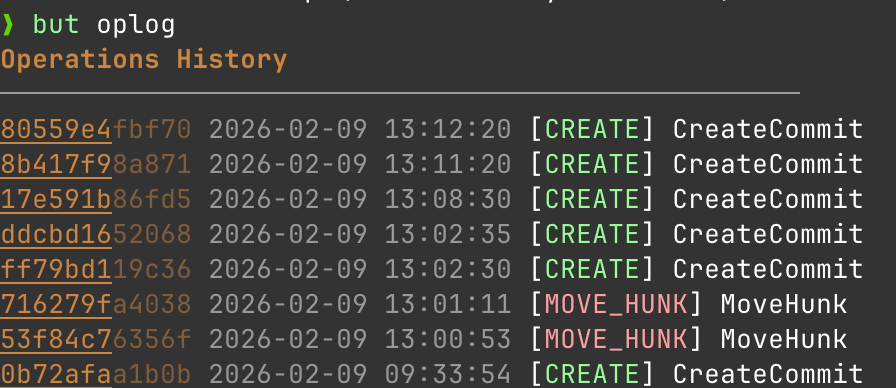
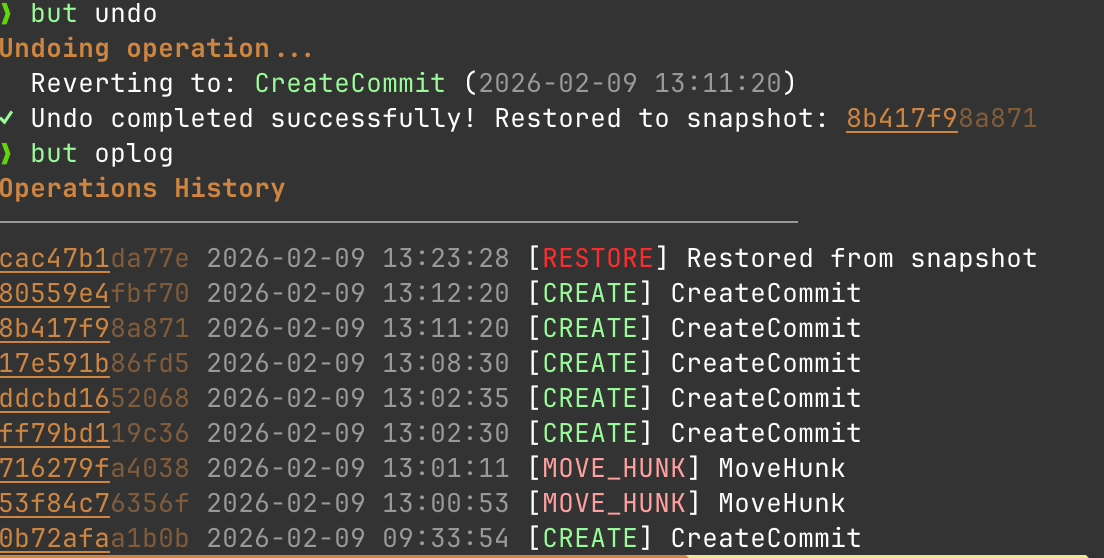
GitButlers oplog is just easier to use. So the basic undo functionality is super simple to understand.
but undo rolls me back one operation.
To me the mental model of a snapshot makes a lot more sense than the git history model. I do an action, I want to undo that action. This is better than the git option of:
git log --oneline                 # figure out what you committed
git reset --soft HEAD~1           # undo commit, keep changes staged
git stash                         # stash the changes
git checkout correct-branch       # switch branches
git stash pop                     # restore changes (hope no conflict)
git add .                         # re-stage
git commit -m "message"           # recommit
Very exciting tool
I've been using GitButler in my daily work since I got the email that the CLI was available and I've really loved it. I'm a huge fan of what this team is doing to effectively remodel and simplify Git operations in a world where almost nobody is using it in the way the tool was originally imagined to be used. I strongly encourage folks go check it out for free at: https://docs.gitbutler.com/cli-guides/cli-tutorial/tutorial-overview. It does a ton of things (like help you manage PRs) that I didn't even touch on here.
I've been working with git now full-time for around a decade now. I use it every day, relying on the command-line version primarily. I've read a book, watched talks, practiced with it and in general use it effectively to get my job done. I even have a custom collection of hooks I install in new repos to help me stay on the happy path. I should like it, based on mere exposure effect alone. I don't.
I don't feel like I can always "control" what git is going to do, with commands sometimes resulting in unexpected behavior that is consistent with the way git works but doesn't track with how I think it should work. Instead, I need to keep a lot in my mind to get it to do what I want. "Alright, I want to move unstaged edits to a new branch. If the branch doesn't exist, I want to use checkout, but if it does exist I need to stash, checkout and then stash pop." "Now if the problem is that I made changes on the wrong branch, I want stash apply and not stash pop." "I need to bring in some cross-repo dependencies. Do I want submodules or subtree?"
I need to always deeply understand the difference between reset, revert, checkout, clone, pull, fetch, cherrypick when I'm working even though some of those words mean the same thing in English. You need to remember that push and pull aren't opposites despite the name. When it comes to merging, you need to think through the logic of when you want rebase vs merge vs merge --squash. What is the direction of the merge? Shit, I accidentally deleted a file awhile ago. I need to remember git rev-list -n 1 HEAD – filename. Maybe I deleted a file and immediately realized it but accidentally committed it. git reset --hard HEAD~1 will fix my mistake but I need to remember what specifically --hard does when you use it and make sure it's the right flag to pass.
Nobody is saying this is impossible and clearly git works for millions of people around the world, but can we be honest for a second and acknowledge that this is massive overkill for the workflow I use at almost every job which looks as follows:
Make a branch
Push branch to remote
Do work on branch and then make a Pull Request
Merge PR, typically with a squash and merge cause it is easier to read
Let CI/CD do its thing.
I've never emailed a patch or restored a repo from my local copy. I don't spend weeks working offline only to attempt to merge a giant branch. We don't let repos get larger than 1-2 GB because then they become difficult to work with when I just need to change like three files and make a PR. None of the typical workflow benefits from the complexity of git.
More specifically, it doesn't work offline. It relies on merge controls that aren't even a part of git with Pull Requests. Most of that distributed history gets thrown away when I do a squash. I don't gain anything with my local disk being cluttered up with out-of-date repos I need to update before I start working anyway.
Now someone saying "I don't like how git works" is sort of like complaining about PHP in terms of being a new and novel perspective. Let me lay out what I think would be the perfect VCS and explore if I can get anywhere close to there with anything on the market.
Gitlite
What do I think a VCS needs (and doesn't need) to replace git for 95% of usecases.
Dump the decentralized model. I work with tons of repos, everyone works with tons of repos, I need to hit the server all the time to do my work anyway. The complexity of decentralized doesn't pay off and I'd rather be able to do the next section and lose it. If GitHub is down today I can't deploy anyway so I might as well embrace the server requirement as a perk.
Move a lot of the work server-side and on-demand. I wanna search for something in a repo. Instead of copying everything from the repo, running the search locally and then just accepting that it might be out of date, run it on the server and tell me what files I want. Then let me ask for just those files on-demand instead of copying everything.
I want big repos and I don't want to copy the entire thing to my disk. Just give me the stuff I want when I request it and then leave the rest of it up there. Why am I constantly pulling down hundreds of files when I work with like 3 of them.
Pull Request as a first-class citizen. We have the concept of branches and we've all adopted the idea of checks that a branch must pass before it can be merged. Let's make that a part of the CLI flow. How great would be it to be able to, inside the same tool, ask the server to "dry-run" a PR check and see if my branch passes? Imagine taking the functionality of the gh CLI and not making it platform specific ala kubectl with different hosted Kubernetes providers.
Endorsing and simplifying the idea of cross-repo dependencies. submodules don't work the way anybody wants them to. subtree does but taking work and pushing it back to the upstream dependency is confusing and painful to explain to people. Instead I want something like: https://gitmodules.com/
My server keeps it in sync with the remote server if I'm pulling from a remote server but I can pin the version in my repo.
My changes in my repo go to the remote dependency if I have permission
If there are conflicts they are resolved through a PR.
Build in better visualization tools. Let me kick out to a browser or whatever to more graphically explore what I'm looking at here. A lot of people use the CLI + a GUI tool to do this with git and it seems like something we could roll into one step.
Easier centralized commit message and other etiquette enforcement. Yes I can distribute a bunch of git hooks but it would be nice if when you cloned the repo you got all the checks to make sure that you are doing things the right way before you wasted a bunch of time only to get caught by the CI linter or commit message format checker. I'd also love some prompts like "hey this branch is getting pretty big" or "every commit must be of a type fix/feat/docs/style/test/ci whatever".
Read replica concept. I'd love to be able to point my CI/CD systems at a read replica box and preserve my primary VCS box for actual users. Primary server fires a webhook that triggers a build with a tag, hits the read replica which knows to pull from the primary if it doesn't have that tag. Be even more amazing if we could do some sort of primary/secondary model where I can set both in the config and if primary (cloud provider) is down I can keep pushing stuff up to somewhere that is backed up.
So I tried out a few competitors to see "is there any system moving more towards this direction".
SVN in 2024
My first introduction to version control was SVN (Subversion), which was pitched to me as "don't try to make a branch until you've worked here a year". However getting SVN to work as a newbie was extremely easy because it doesn't do much. Add, delete, copy, move, mkdir, status, diff, update, commit, log, revert, update -r, co -r were pretty much all the commands you needed to get rolling. Subversion has a very simple mental model of how it works which also assists with getting you started. It's effectively "we copied stuff to a file server and back to your laptop when you ask us to".
I have to say though, svn is a much nicer experience than I remember. A lot of the rough edges seem to have been sanded down and I didn't hit any of the old issues I used to. Huge props to the Subversion team for delivering great work.
Subversion Basics
Effectively your Subversion client commits all your files as a single atomic transaction to the central server as the basic function. Whenever that happens, it creates a new version of the whole project, called a revision. This isn't a hash, it's just a number starting at zero, so there's no confusion as a new user what is the "newer" or "older" thing. These are global numbers, not tied to a file, so it's the state of the world. For each individual file there are 4 states it can be in:
Unchanged locally + current remote: leave it alone
Locally changed + current remote: to publish the change you need to commit it, an update will do nothing
Unchanged locally + out of date remotely: svn update will merge the latest copy into your working copy
Locally changed + out of date remotely: svn commit won't work, svn update will try to resolve the problem but if it can't then the user will need to figure out what to do.
It's nearly impossible to "break" SVN because pushing up doesn't mean you are pulling down. This means different files and directories can be set to different revisions, but only when you run svn update does the whole world true itself up to the latest revision.
Working with SVN looks as follows:
Ensure you are on the network
Run svn update to get your working copy up to latest
Make the changes you need, remembering not to use OS tooling to move or delete files and instead use svn copy and svn move so it knows about the changes.
Run svn diff to make sure you want to do what you are talking about doing
Run svn update again, resolve conflicts with svn resolve
Feeling good? Hit svn commit and you are done.
Why did SVN get dumped then? One word: branches.
SVN Branches
In SVN a branch is really just a directory that you stick into where you are working. Typically you do it as a remote copy and then start working with it, so it looks more like you are copying the URL path to a new URL path. But to users they just look like normal directories in the repository that you've made. Before SVN 1.4 merging a branch required a masters degree and a steady hand, but they added an svn merge which made it a bit easier.
Practically you are using svn merge against the main to keep your branch in sync and then when you are ready to go, you run svn merge --reintegrate to push the branch to master. Then you can delete the branch, but if you need to read the log the URL of the branch will always work to read the log of. This was particularly nice with ticket systems where the URL was just the ticket number. But you don't need to clutter things up forever with random directories.
In short a lot of the things that used to be wrong with svn branches aren't anymore.
What's wrong with it?
So SVN breaks down IME when it comes to automation. You need to make it all yourself. While you do you have nuanced access control over different parts of a repo, in practice this wasn't often valuable. What you don't have is the ability to block someone from merging in a branch without some sort of additional controls or check. It also can place a lot of burden on the SVN server since nobody seems to ever update them even when you add a lot more employees.
Also the UIs are dated and the entire tooling ecosystem has started to rot from users leaving. I don't know if I could realistically recommend someone jump from git to svn right now, but I do think it has a lot of good ideas that moves us closer to what I want. It would just need a tremendous amount of UI/UX investment in terms of web to get it to where I would like using it over git. But I think if someone was interested in that work, the fundamental "bones" of Subversion are good.
Sapling
One thing I've heard from every former Meta engineer I've worked with is how much they miss their VCS. Sapling is that team letting us play around with a lot of those pieces, adopted for a more GitHub-centric world. I've been using it for my own personal stuff for a few months and have really come to fall in love with it. It feels like Sapling is specifically designed to be easy to understand, which is a delightful change.
A lot of the stuff is the same. You clone with sl clone, you check the status with sl status and you commit with sl commit. The differences that immediately stick out are the concept of stacks and the concept of the smartlog. So stacks are "collections of commits" and the idea is that from the command line I can issue PRs for those changes with sl pr submit with each GitHub PR being one of the commits. This view (obviously) is cluttered and annoying, so there's another tool that helps you see the changes correctly which is ReviewStack.
None of this makes a lot of sense unless I show you what I'm talking about. I made a new repo and I'm adding files to it. First I check the status:
❯ sl
o  5a23c603a  108 seconds ago  mathew.duggan
│  feat: adding the exceptions handler
│
o  2652cf416  2 minutes ago  mathew.duggan
│  feat: adding auth
│
@  2f5b8ee0c  11 minutes ago  mathew.duggan
   Initial Commit
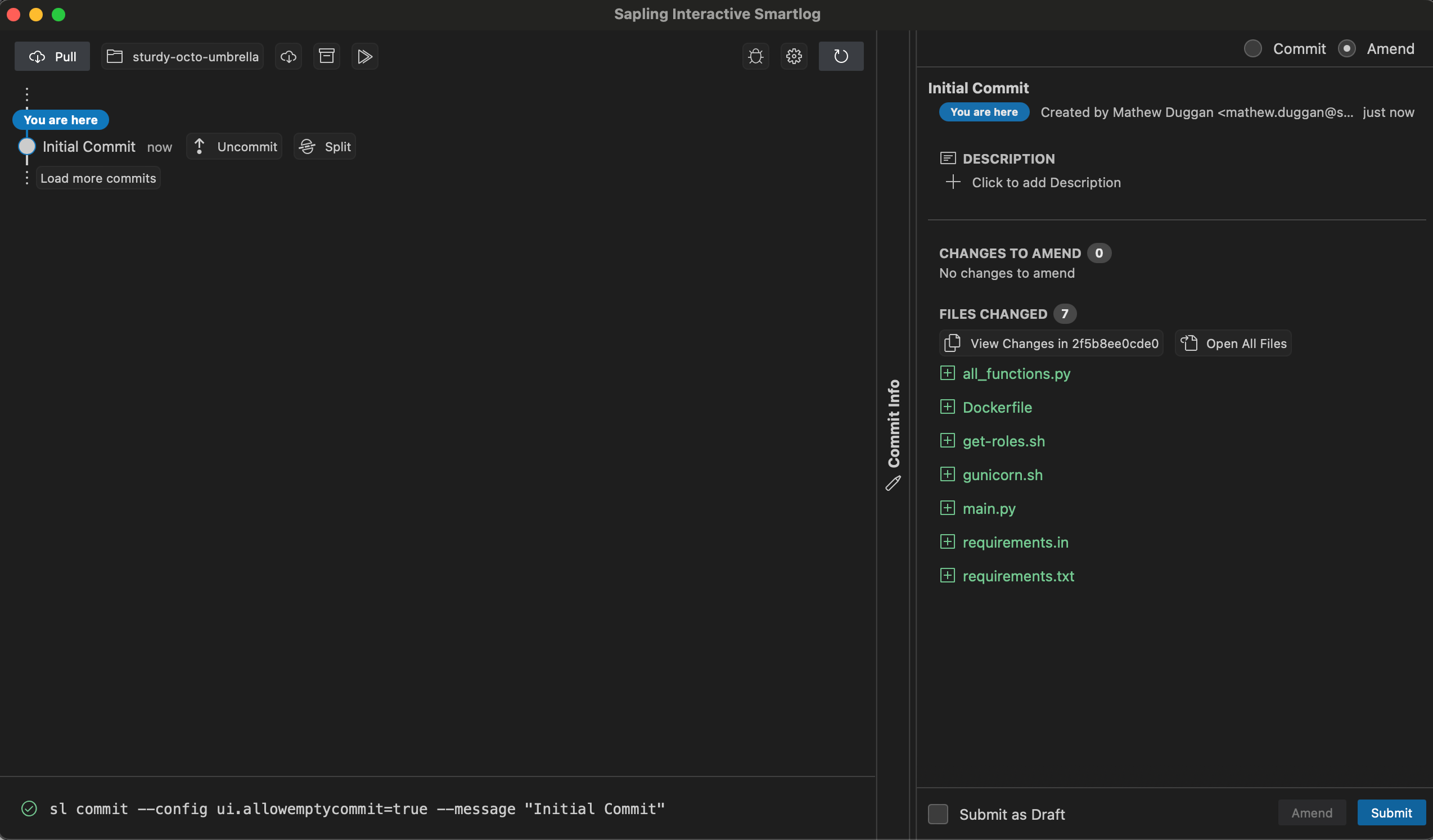
This also shows up in my local web UI
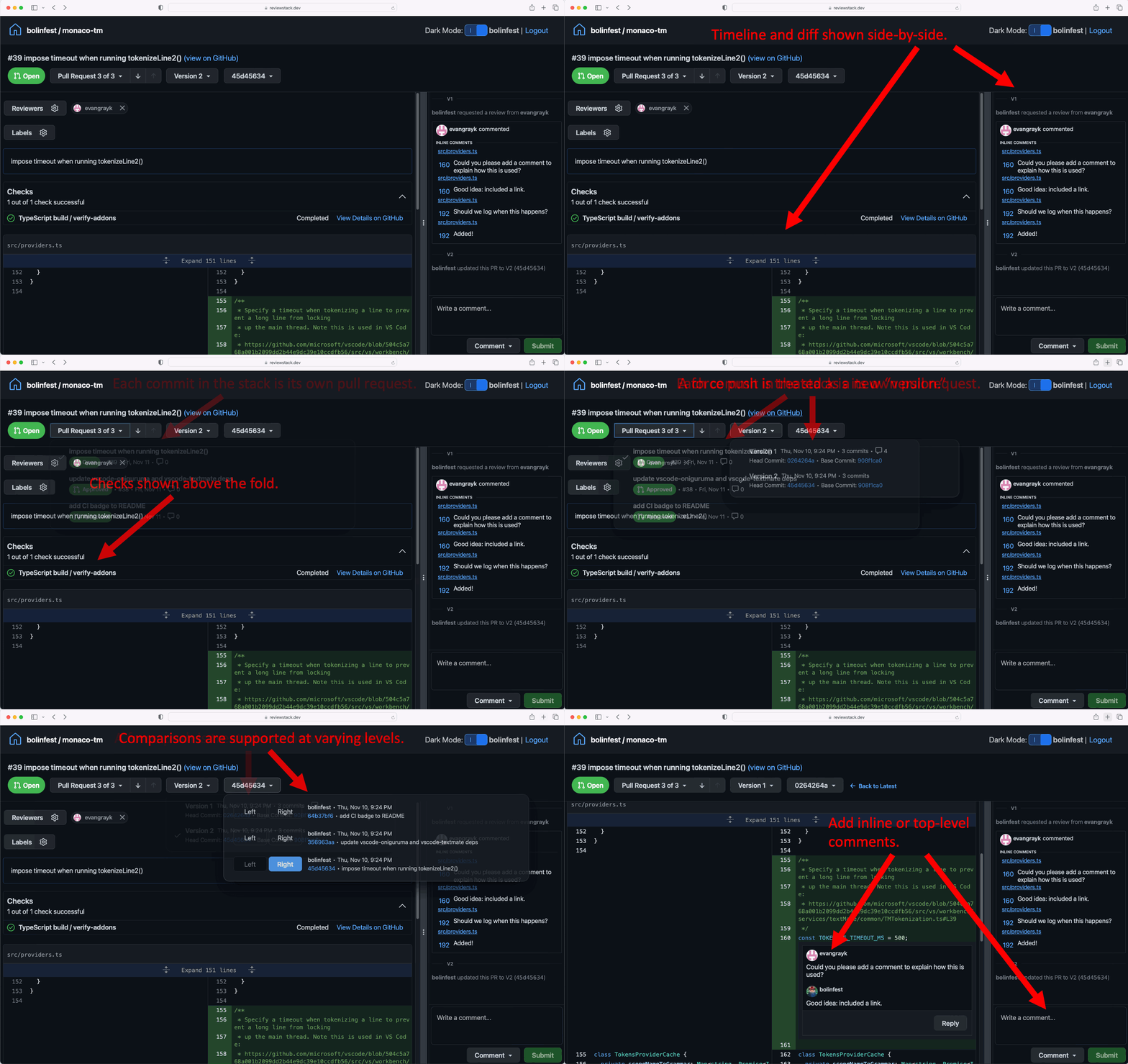
Finally the flow ends with sl pr to create Pull Requests. They are GitHub Pull Requests but they don't look like normal GitHub pull requests and you don't want to review them the same way. The tool you want to use for this is ReviewStack.
I stole their GIF because it does a good job
Why I like it
Sapling lines up with what I expect a VCS to do. It's easier to see what is going on, it's designed to work with a large team and it surfaces the information I want in a way that makes more sense. The commands make more sense to me and I've never found myself unable to do something I needed to do.
More specifically I like throwing away the idea of branches. What I have is a collection of commits that fork off from the main line of development, but I don't have a distinct thing I want named that I'm asking you to add. I want to take the main line of work and add a stack of commits to it and then I want someone to look at that collection of commits and make sure it makes sense and then run automated checks against it. The "branch" concept doesn't do anything for me and ends up being something I delete anyway.
I also like that it's much easier to undo work. This is something where I feel like git makes it really difficult to handle and uncommit, unamend, unhide, and undo in Sapling just work better for me and always seem to result in the behavior that I expected. Losing the staging area and focusing more on easy to use commands is a more logical design.
Why you shouldn't switch
If I love Sapling so much, what's the problem? So to get Sapling to the place I actually want it to be, I need more of the Meta special sauce running. Sapling works pretty well on top of GitHub, but what I'd love is to get:
I'd love to try all of this together (and since there is source code for a lot of it, I am working on trying to get it started) but so far I don't think I've been able to see the full Sapling experience. All these pieces together would provide a really interesting argument for transitioning to Sapling but without them I'm really tacking a lot of custom workflow on top of GitHub. I think I could pitch migrating wholesale from GitHub to something else, but Meta would need to release more of these pieces in an easier to consume fashion.
Scalar
Alright so until Facebook decided to release the entire package end to end, Sapling exists as a great stack on top of GitHub but not something I could (realistically) see migrating a team to. Can I make git work more the way I want to? Or at least can I make it less of a pain to manage all the individual files?
Microsoft has a tool that does this, VFS for Git, but it's Windows only so that does nothing for me. However they also offer a cross-platform tool called Scalar that is designed to "enable working with large repos at scale". It was originally a Microsoft technology and was eventually moved to git proper, so maybe it'll do what I want.
What scalar does is effectively set all the most modern git options for working with a large repo. So this is the built-in file-system monitor, multi-pack index, commit graphs, scheduled background maintenance, partial cloning, and clone mode sparse-checkout.
So what are these things?
The file system monitor is FSMonitor, a daemon that tracks changes to files and directories from the OS and adds them to a queue. That means git status doesn't need to query every file in the repo to find changes.
Take the git pack directory with a pack file and break it into multiples.
Commit graphs which from the docs:
" The commit-graph file stores the commit graph structure along with some extra metadata to speed up graph walks. By listing commit OIDs in lexicographic order, we can identify an integer position for each commit and refer to the parents of a commit using those integer positions. We use binary search to find initial commits and then use the integer positions for fast lookups during the walk."
Finally clone mode sparse-checkout. This allows people to limit their working directory to specific files
The purpose of this tool is to create an easy-mode for dealing with large monorepos, with an eye towards monorepos that are actually a collection of microservices. Ok but does it do what I want?
Why I like it
Well it's already built into git which is great and it is incredibly easy to use and get started with. Also it does some of what I want. Taking a bunch of existing repos and creating one giant monorepo, the performance was surprisingly good. The sparse-checkout means I get to designate what I care about and what I don't and also solves the problem of "what if I have a giant directory of binaries that I don't want people to worry about" since it follows the same pattern matching as .gitignore
Now what it doesn't do is radically change what git is. You could grow a repo to much much larger with these defaults set, but it's still handling a lot of things locally and requiring me to do the work. However I will say it makes a lot of my complaints go away. Combined with the gh CLI tool for PRs and I can cobble together a reasonably good workflow that I really like.
So while this is definitely the pattern I'm going to be adopting from now on (monorepo full of microservices where I manage scale with scalar), I think it represents how far you can modify git as an existing platform. This is the best possible option today but it still doesn't get me to where I want to be. It is closer though.
So where does this leave us? Honestly, I could write another 5000 words on this stuff. It feels like as a field we get maddeningly close to cracking this code and then give up because we hit upon a solution that is mostly good enough. As workflows have continued to evolve, we haven't come back to touch this third rail of application design.
Why? I think the people not satisfied with git are told that is a result of them not understanding it. It creates a feeling that if you aren't clicking with the tool, then the deficiency is with you and not with the tool. I also think programmers love decentralized designs because it encourages the (somewhat) false hope of portability. Yes I am entirely reliant on GitHub actions, Pull Requests, GitHub access control, SSO, secrets and releases but in a pinch I could move the actual repo itself to a different provider.
Hopefully someone decides to take another run at this problem. I don't feel like we're close to done and it seems like, from playing around with all these, that there is a lot of low-hanging optimization fruit that anyone could grab. I think the primary blocker would be you'd need to leave git behind and migrate to a totally different structure, which might be too much for us. I'll keep hoping it's not though.